Taskiter vs Clockify
A Clockify alternative when time should lead to tasks and margin
Taskiter tracks time where your team works: in the task on the sprint board. Hours feed the project budget and margin straight away, and your client sees progress in a portal.
Compare
What you get with Taskiter
Tasks, time, hour approval, finances, the client portal, AI and MCP work in one product on the same data.
| What you gain | In Taskiter |
|---|---|
| PriceYou start for free, and on paid plans you pay per person per month. | Free at $0: up to 3 people, 2 projects and 1,000 tasks. Pro $9.99 and Business $19.99 per person per month. |
| Tasks and sprintsYou plan work and track time in the same task. | Tasks, Kanban board, backlog, sprints and epics on every plan. |
| Work timeEvery hour has context: task, sprint and project. | A timer started from the task, a weekly timesheet and team time records on every plan. |
| Hour approval and period settlementOnce a period is closed, approved hours no longer change. | Hour approval, period settlement and locking of settled time on the Business plan. Timesheets on every plan. |
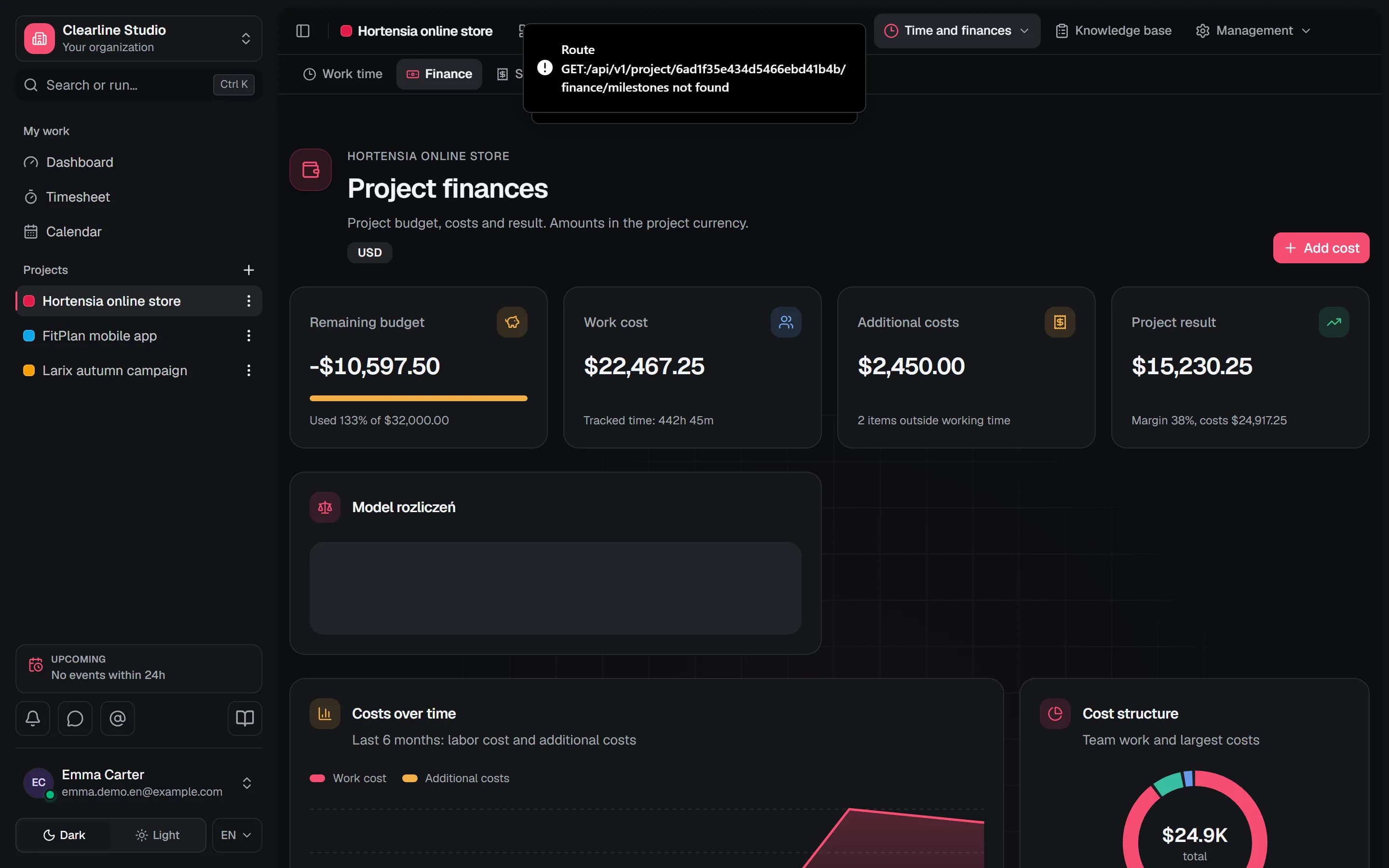
| Project financesYou see the margin during the project, not only after it ends. | Rates, labour cost, budget and project margin in real time, from the Pro plan. |
| Client portalYour client checks progress on their own, and you write fewer reports. | A client portal with sprint progress, released changes and requests, without access to the workspace, on the Business plan. |
| Guardian AIAI helps you plan the week and points out risks, and you decide on changes. | Guardian AI from the Pro plan, with a monthly AI budget in USD. You approve changes proposed by AI after a preview. |
| MCP and AI agentsAI assistants work on your tasks within your permissions. | An MCP server for AI assistants (e.g. Claude Code, Codex, Cursor) on every plan. |
| GitHubThe task status changes together with the pull request. | GitHub integration: pull requests on the task and automatic statuses, on the Business plan. |
| Polish and English interface, data in the EUYour team works in Polish or English, and company data stays in the European Union. | Interface in Polish and English. Data and uploaded files stored in the EU. |
Price
You start for free, and on paid plans you pay per person per month.
Free at $0: up to 3 people, 2 projects and 1,000 tasks. Pro $9.99 and Business $19.99 per person per month.
Tasks and sprints
You plan work and track time in the same task.
Tasks, Kanban board, backlog, sprints and epics on every plan.
Work time
Every hour has context: task, sprint and project.
A timer started from the task, a weekly timesheet and team time records on every plan.
Hour approval and period settlement
Once a period is closed, approved hours no longer change.
Hour approval, period settlement and locking of settled time on the Business plan. Timesheets on every plan.
Project finances
You see the margin during the project, not only after it ends.
Rates, labour cost, budget and project margin in real time, from the Pro plan.
Client portal
Your client checks progress on their own, and you write fewer reports.
A client portal with sprint progress, released changes and requests, without access to the workspace, on the Business plan.
Guardian AI
AI helps you plan the week and points out risks, and you decide on changes.
Guardian AI from the Pro plan, with a monthly AI budget in USD. You approve changes proposed by AI after a preview.
MCP and AI agents
AI assistants work on your tasks within your permissions.
An MCP server for AI assistants (e.g. Claude Code, Codex, Cursor) on every plan.
GitHub
The task status changes together with the pull request.
GitHub integration: pull requests on the task and automatic statuses, on the Business plan.
Polish and English interface, data in the EU
Your team works in Polish or English, and company data stays in the European Union.
Interface in Polish and English. Data and uploaded files stored in the EU.
Why teams switch
Three things you get with Taskiter
Fit
When Taskiter is the better fit
What your team gains
- Your team plans work in tasks and sprints and tracks time in the same place.
- Project margin and period settlement with change locking are in one product.
- Your client sees progress and released changes in a portal.
- AI assistants connect to your tasks through the MCP server on every plan.
Clockify strengths
- A low entry price: the Basic plan from $3.99 per person per month billed annually.
- Features for field and shift work: kiosk from the Basic plan, GPS and scheduling on the Pro plan.
For comparison: Clockify
- A Free plan, plus Basic $3.99, Standard $5.49, Pro $7.99 and Enterprise $11.99 per person per month billed annually.
Migration
Moving your data from Clockify
You export your data to a CSV file and upload it in the import wizard. Before anything is saved, you see a preview and a dry-run report.
- 1
Export from Clockify to a CSV file
Reports exported to CSV, Excel or PDF (to PDF on the Free plan).
- 2
Upload the file in the import wizard
The wizard recognises the encoding, the separator and the Clockify export, then suggests a column mapping.
- 3
People, statuses and target project
People are matched by email address, and you choose statuses and the project in the wizard.
- 4
Preview and dry run
Before saving, you see a report: how many items will be imported and what needs fixing.
- 5
Import with the option to undo
FAQ
Frequently asked questions
When is Taskiter worth it?
When besides time you need tasks, sprints, project margin and a client portal in one tool. You have one product and one set of data.
How does hour approval work?
A person submits a week or a month, and the approver accepts the hours or asks for corrections. A closed period is locked against changes. Hour approval and period settlement are on the Business plan.
Can I move my data from Clockify?
You export your data from Clockify to a CSV file and upload it in the Taskiter CSV import wizard, which recognises the Clockify export and suggests a column mapping.
Does Taskiter have a free plan?
Yes. The Free plan costs USD 0 and covers up to 3 people, 2 projects and 1,000 tasks, with tasks, sprints and the time tracker.
Comparisons
Other comparisons
See how much each of your projects really earns
Create an account and bring over one project. Try Business features without Guardian AI for 7 days, for 3 people, 2 projects, and 1,000 tasks, with no payment card required.
Free plan with no time limit for teams of up to 3 people.
Comparison prepared by Taskiter. Clockify and other product names are trademarks of their respective owners and are used for identification only. Taskiter is not affiliated with or endorsed by these companies.
Spotted outdated information? Write to us.